
Music: Eric Skiff - Song Name - Resistor Anthems - Available at http://EricSkiff.com/music
(Autoplay may not work on all browsers.)
-Bfxr for Windows, Mac, Browser
(Download)-Sfxr for Linux
(Download)-Bosca Ceoil
(Download)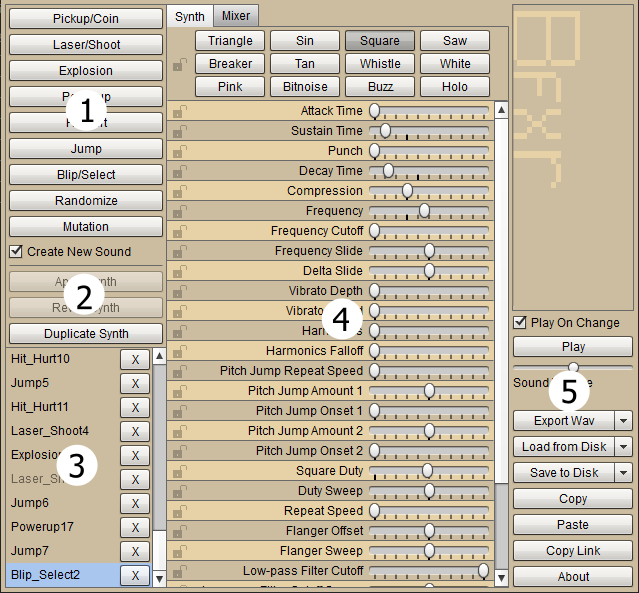
- You can select what type of sound effect you want here. The sound effects you will use will be entirely dependent on the type of game you are making.
- You can undo, apply, and duplicate sound effects here. The undo and apply can only be used in the mixer mode of the editor.
- You can select previous sounds you have tested earlier here. Just click on the sound you'd like to hear again.
- You can change certain parts of the sound effects here. Adjust the sliders until you are satisfied with the sound. You can also mix different sound effects in mixer.
- You can play, load, export and save the sound effects you created here. Select save if you want to edit the sound for later and select export if you want to use the sound in the game engine.
- Try experimenting using different scales of music.
- If your music sounds bad or weird, try changing your instruments or positions of the chords.
- Don't use too many instruments at the same time.
- For games it is recommended to make your music loop seamlessly
- Music in a game can really change it's overall mood so make sure your music matches your game.
- Lastly, don't give up. :)
Here you'll learn how to program your game in a game engine.
Here you'll learn how to create character and environment art for your game.